Do You Know How a Chatbot Actually Works?
A visual tour of what happens inside a chatbot: tokens, the context window, hidden instructions, compaction, memory, and reasoning tokens.
More and more people are using chatbots to inform, or even make, critical decisions. Yet few have a clear picture of what data the model is actually operating on.
As an example, according to depositions and other materials released as part of a civil lawsuit related to US federal funding cuts, the Department of Government Efficiency (DOGE) relied on ChatGPT to identify more than $100 million in grants related to diversity, equity, and inclusion (DEI) that were later cancelled. Because of how chatbots handle documents (as we will explore below), it is not clear whether the model was actually operating on the entire data.
Researchers are also beginning to examine these tools more closely. Nguyen and Welch (2025) explored whether ChatGPT can conduct qualitative data analysis and found it to be unreliable for this task. However, their study does not report whether memory was turned off or which subscription tier was used, both of which directly influence what data the model operates on and, consequently, the outputs it produces.
These examples highlight a gap. A lot of people think generative AI literacy simply means knowing how to use the user interface of a chatbot: typing prompts, clicking buttons, and getting answers. But to me, it goes much deeper than that. Generative AI literacy means understanding what data the model is actually operating on at any given moment.
This post focuses on the context window. I believe understanding it is a core part of AI literacy.
Tokens
Large language models operate only on tokens. When you type something into a chatbot and press send, that text is invisibly converted into tokens. You can assume that one word is roughly one token. You can play around with the OpenAI tokeniser to see this in action.
A context window is simply the finite number of tokens a model can see and process at one time. Many chatbot products hide the existence of this limitation from users.
But how do we know the context window exists? Well, aside from reading technical documentation, you can test it yourself. Try pasting massive amounts of text into a chatbot and you will encounter an error telling you that the input is too long. Some chatbots may not even allow you to press send.
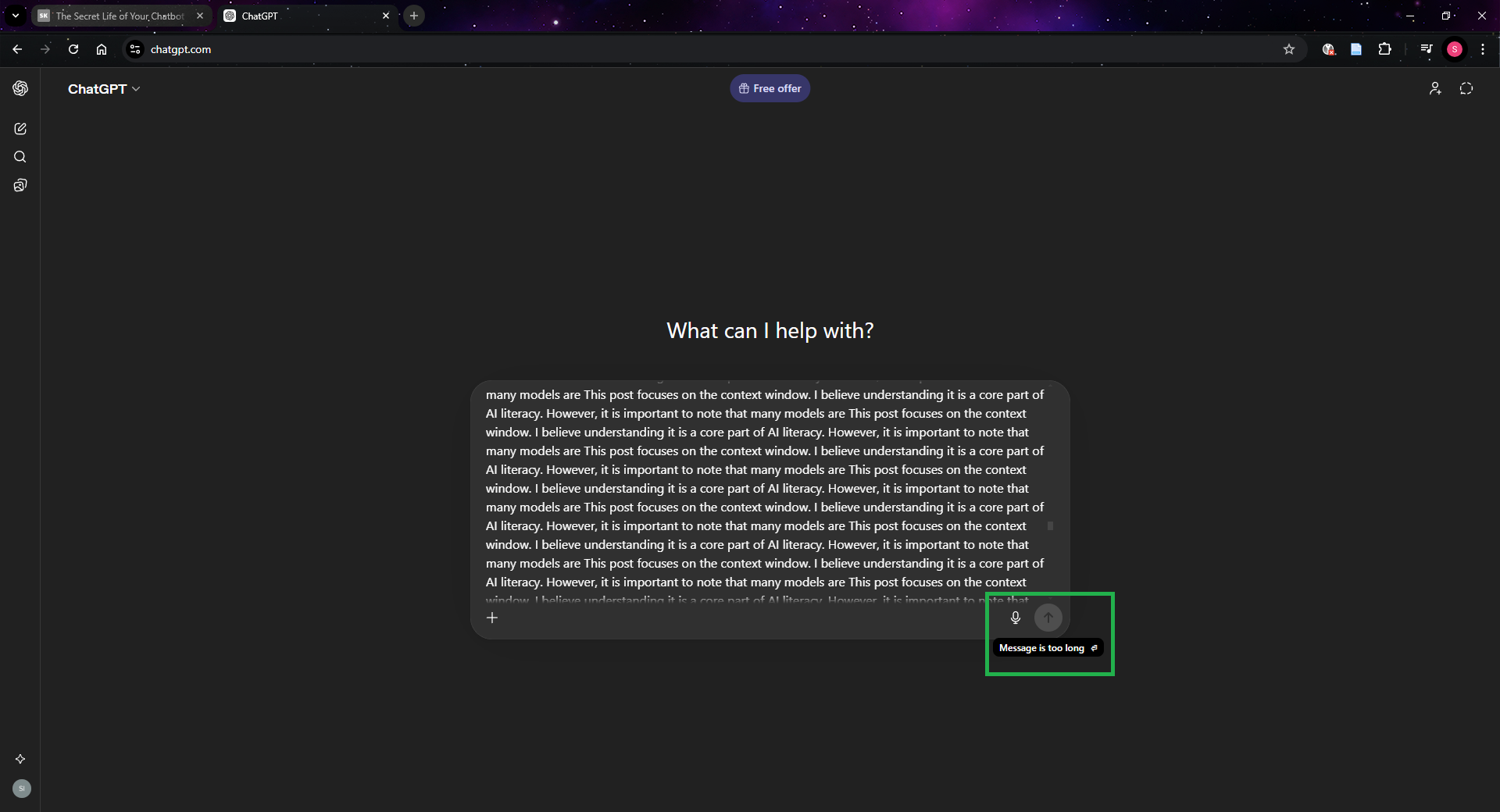 ChatGPT refusing to send a message that exceeds the context window.
The easiest way to think about the context window is to imagine a fixed-size box. Every message you send, every response from the assistant, it all must fit inside this box. The size of the box depends on the model being used. But in practice, that is not always the full story. With some providers, the size of the box is also influenced by the subscription tier you are paying for. For example, OpenAI lists different context window sizes for each tier on its pricing page.
What happens as you chat
In a multi-turn conversation, every new message (both yours and the assistant’s) takes up space in the box. As the conversation grows, these messages steadily consume the available context window.
So what happens when the box becomes full? In many chatbot systems, providers perform invisible operations to make space in the box and to keep the experience feeling seamless. They might remove older messages, summarise earlier parts of the conversation, truncate sections in the middle, or simply stop the chat and ask you to start a new session. Anthropic, for example, describes this openly: when a conversation approaches the limit, Claude automatically summarises earlier messages to make room for new content. In fact, in open source software such as LMStudio, you can control this behaviour directly.
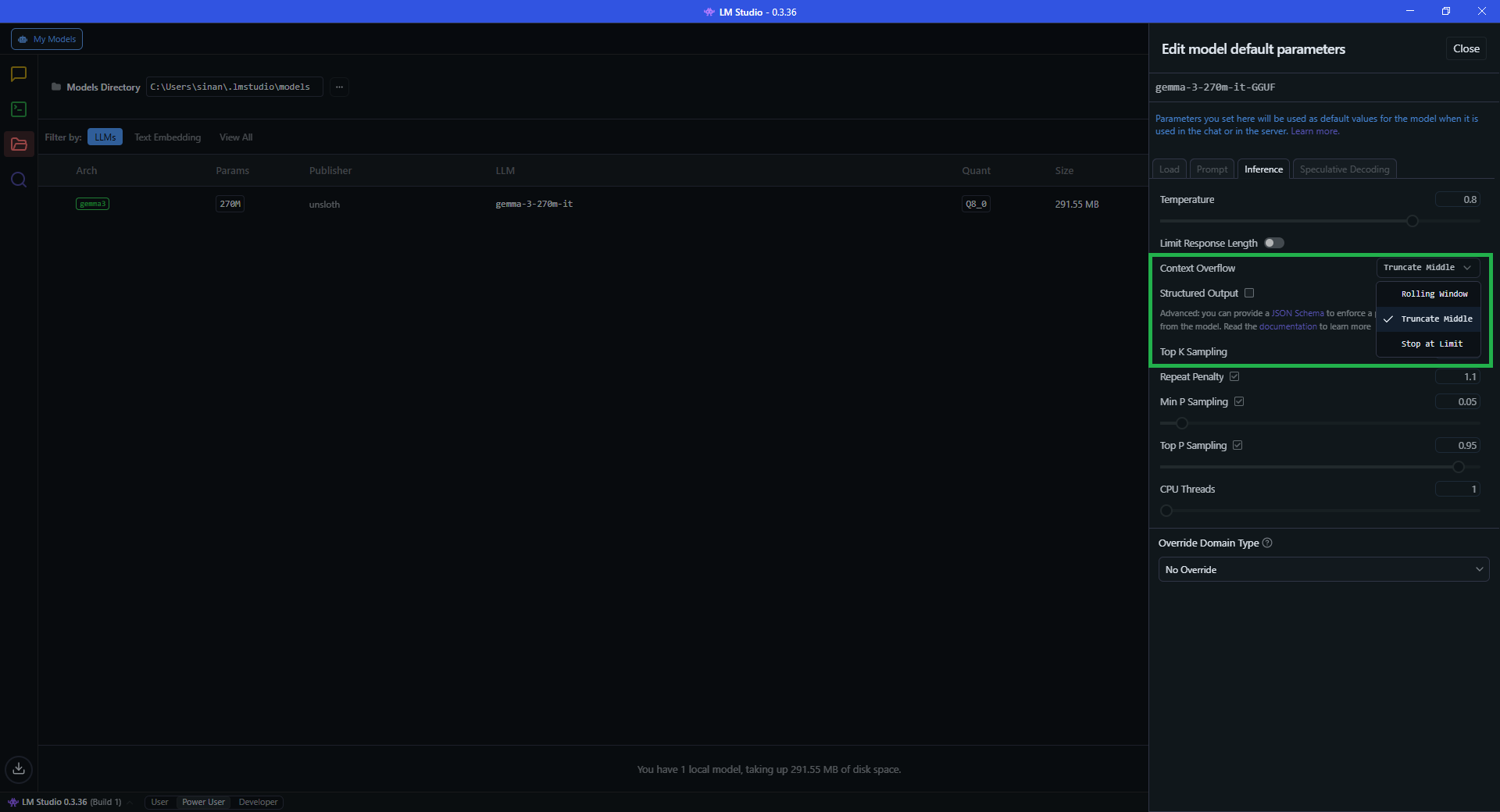 LMStudio lets you choose what happens when the context window overflows.
When this kind of invisible compaction happens, the chatbot is no longer operating on the full conversation you think it is.
Hidden instructions
It is not just your visible messages that consume space in the context window. Behind the scenes, chatbot systems often include additional hidden instructions, such as root prompts, system prompts, or developer prompts. OpenAI, for example, describes these layers of authority in its model spec. These hidden messages also occupy space inside the box. In other words, the context window is already partially filled before you even begin typing.
How much space do they take? Anthropic publishes its system prompts openly, and a community repository of leaked system prompts from other providers shows that some of these can be surprisingly long.
As of 2024, many chatbot systems have introduced long-term memory features, including ChatGPT, Claude, and Gemini. These allow previous conversations or stored user information to influence responses. But those pieces of information also have to be inserted into the context window during generation. In fact, when memory is enabled, the box already starts with this information inside it.
Uploading documents
Often, a document is far larger than the context window itself. So providers use additional techniques to create the appearance that the chatbot is reading the entire document.
In reality, only small portions of the document are placed into the context window at any given time. Other parts may be stored in systems like vector databases, and pieces are retrieved when they appear relevant to your prompt. From the user’s perspective, it can look like the model is analysing the entire document, but it is often operating on selected fragments.
OpenAI offers a rare glimpse into how this works. In its documentation for ChatGPT Enterprise, it explains that if a single document exceeds 110k tokens, only the first 110k are included in the context window. If multiple documents are uploaded and their combined total exceeds that limit, tokens are divided among them using a proportional allocation strategy. Anything left over is sent to a search index and retrieved only when it appears relevant to your prompt.
Put all of this together on a real subscription tier and the maths gets uncomfortable. Hidden instructions, memory, a document, and a couple of exchanges can fill a 32k context window (such as ChatGPT’s Go and Plus tier) before the conversation really starts. Once that happens, compaction kicks in, and the data the model is operating on is no longer what you originally provided.
Reasoning tokens
Another complication comes from reasoning tokens. Some models generate internal reasoning steps while producing an answer. These intermediate tokens can temporarily consume space in the context window as the model works through a problem. OpenAI notes that depending on the problem’s complexity, models may generate anywhere from a few hundred to tens of thousands of reasoning tokens, and that it is important to ensure there is enough space in the context window to accommodate them.
Exactly how providers manage these tokens, especially as they approach the limits of the context window, is not well documented. For example, if reasoning tokens temporarily consume space while you are reaching the limit of the context window, does a compaction operation occur? I do not know.
So where does that leave us?
Four years after the rapid global adoption of these systems, there is still very limited transparency from providers about how they operate under the hood. This is surprising, because many of these companies publicly advocate for responsible AI use.
Yet to this day, there is still no clear user manual explaining how these systems manage context, memory, or internal reasoning. And when you ask support teams for clarification, the answer is often the same:
Sorry, we cannot share that information because it is proprietary.
Which raises an important question. If society is expected to use these systems responsibly, shouldn’t we also be given a clearer understanding of how they actually work?